Litematica Vulnerability Update Notice 2026-07-08
Description
The following is from https://bbs.mcmod.cn/thread-23640-1-1.html:
Original Post
Original Title: Important Announcement: Litematica vulnerability in MC 1.21+:litematica
Originally posted on the r/litematica board on Tuesday, July 7, 2026, GMT+8 04:15:31, by masa_.
Translated by: @El_Trueno. Please credit the source when reposting.

Here is the translated post:

Last night (July 6, 2026, GMT+8 4:00), we received a notification from the "exploit community" (specifically Autism Inc and DuperUnited) that certain versions of the Litematica and Servux mods have a security vulnerability.

This vulnerability allows a malicious attacker to send arbitrary files (not limited to schematic files) from the server to the client, and can write these files to any unexpected directory. The most obvious consequence is that an attacker can remotely install malware.
In other words, if you're playing on a server with an affected version of Litematica installed (it could be an outright malicious server; or one that was previously trusted but has a vulnerable version of Servux, allowing malicious players to exploit the infection), then your computer may already be affected.

This vulnerability primarily affects Litematica and Servux on MC 1.21 and above.
I can't be 100% sure when this vulnerability was introduced, but based on Git commit history, the commit was made on May 19, 2025, and subsequently affected the official release 1.21.5-0.22.2-sakura.4 on June 22, 2025.

Later, from the Git commit history, we can see that the vulnerability was backported to these versions on December 31, 2025:
1.21.4-0.21.6
1.21.3-0.20.8
1.21-0.19.60

Additionally, Litematica versions 1.21.6 and above are also affected, until the recently released fixed versions.

What should I do?

Immediately update Litematica to the latest version released on Modrinth!
Also, if you cannot fully trust the server owner and admins, do NOT join their servers!

The list of Litematica versions with the fix is as follows:
MC 26.2: 0.28.3
MC 26.1.x: 0.27.9
MC 1.21.11: 0.26.11
MC 1.21.9 - 1.21.10: 0.24.8
MC 1.21.6 - 1.21.8: 0.23.7
MC 1.21.5: 0.22.5
MC 1.21.4: 0.21.7
MC 1.21.2 - 1.21.3: 0.20.9
MC 1.21 - 1.21.1: 0.19.61

If your server has Servux installed, Servux also needs to be immediately upgraded to the latest version.

The Servux versions with the fix are as follows:
MC 26.2: 0.11.2
MC 26.1.x: 0.10.4
MC 1.21.11: 0.9.5
MC 1.21.9 - 1.21.10: 0.8.7
MC 1.21.6 - 1.21.8: 0.7.7
MC 1.21.5: 0.6.4
MC 1.21.4: 0.5.7
MC 1.21.2 - 1.21.3: 0.4.8
MC 1.21 - 1.21.1: 0.3.17

How to check if your computer is affected?
One possible check method is: search the entire file system for files whose names (excluding the actual file extension) contain the string .litematic. For example, a file like somevirus.litematic.jar in the mods/ directory.

Of course, this method is not foolproof. If the malware can rename or hide itself, the above method won't work.
Since we can't be sure whether the current version of Litematica has this issue, it's recommended to update to the latest version immediately.
However, based on actual testing, the latest version of Litematica conflicts with Masa Gadget, which will cause a crash when entering the server after updating to the latest version.
There is currently no temporary fix for Masa Gadget that resolves the conflict with Litematica.
Therefore, please determine whether you use features from the Masa Gadget mod, and then decide whether to update Litematica.
If you do use features from Masa Gadget, you may choose not to update for now. But before joining any unfamiliar or untrusted server, you need to weigh the safety yourself, and be sure to update Litematica to the latest version before entering other servers to avoid being attacked.
Additionally, even if you choose not to update Litematica, I still recommend updating Servux installed in your client. The update method is the same as the tutorial below — you just don't need to select Litematica, and don't need to disable conflicting mods. You only need to update Servux.
Currently, on the server, both the main server and creative server have updated Servux to the fixed version 0.3.17.
A suggestion:
Keep the client for this server separate from clients for other servers. Make sure the current client is only used for
DDS Minecraft Serverand is not used on other servers, to ensure safety.
The modpack's mod versions are not being modified for now. If needed, you can update the mods yourself after installing the client.
Update Mods
Note: Please follow the tutorial to update mods, because not all mods can be updated
The mods you need to update are Litematica and Servux — only these two mods.
Why can't I just update all mods at once?
Because mods need to be compatible with each other. Randomly updating may cause crashes.
Since the mods installed on the client and server need to match in version as closely as possible, randomly updating mods could also prevent you from joining the server.
Using Plain Craft Launcher 2
(Hereinafter referred to as PCL2)
First, select the version you want to update, then tap Version Settings, then tap Mod Management on the left. You should see an interface like the one below.
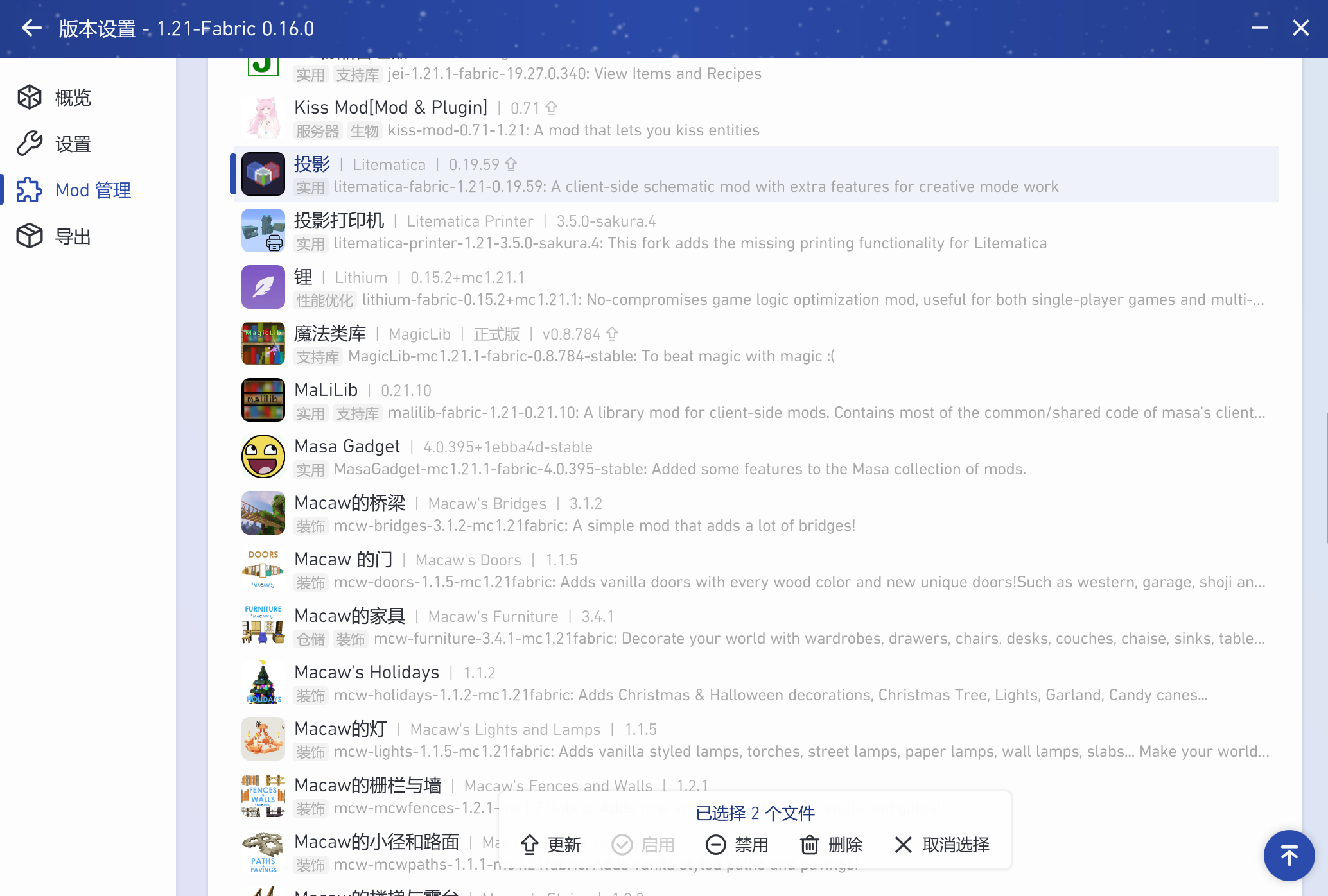
In the list, find Litematica and Servux, left-click each one to select them. You'll see a prompt at the bottom saying "2 files selected". Then tap Update and follow the prompts.
After updating the mods, please continue following this document to disable the conflicting mods to avoid crashes!
Using Hello Minecraft! Launcher
(Hereinafter referred to as HMCL)
First, select the version you want to update, then tap Instance Management, then tap Mod Management on the left. You should see an interface like the one below.
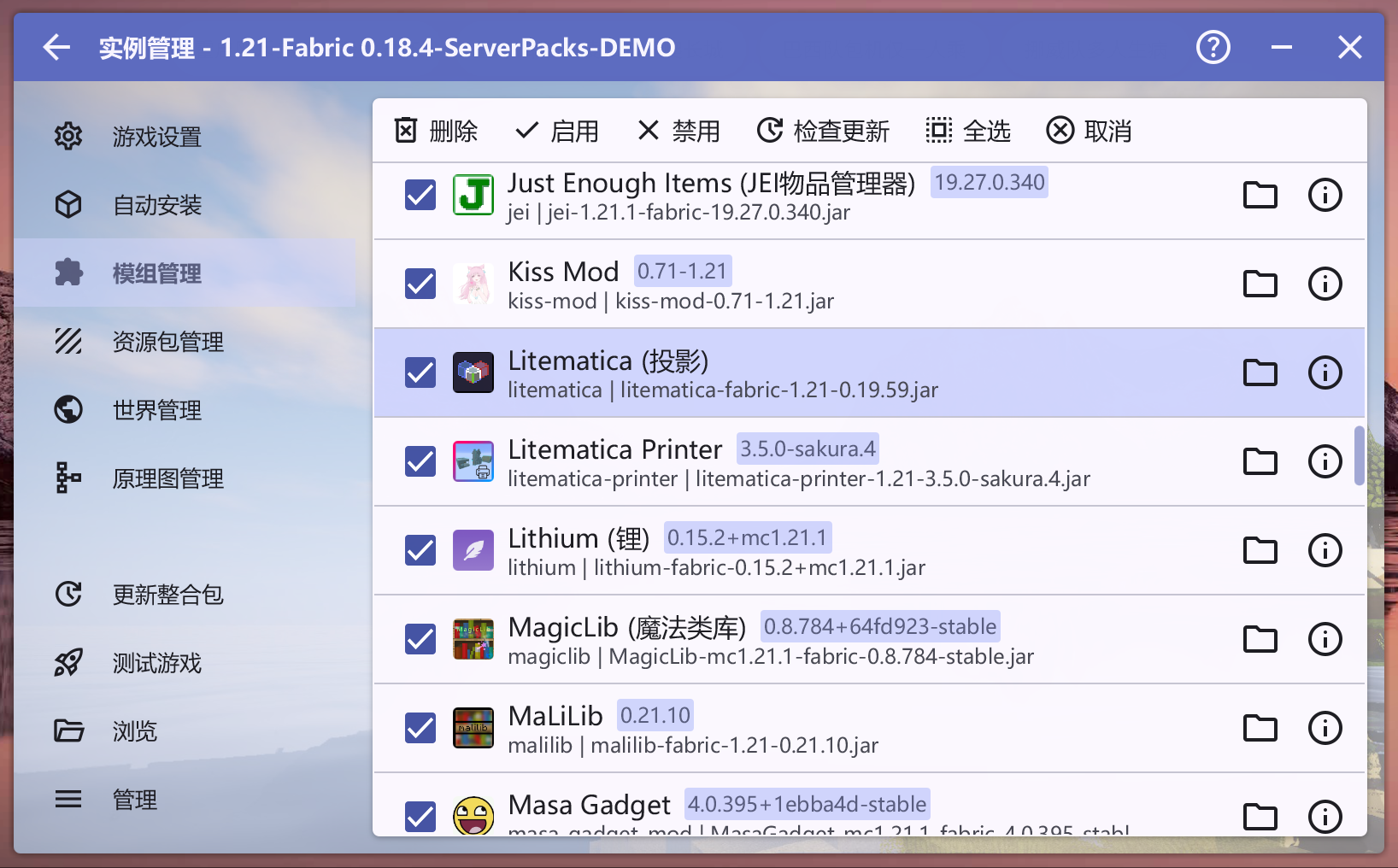
In the list, find Litematica and Servux. First, hold down the Ctrl key on your keyboard, then left-click each one to select them. Then tap Check for Updates at the top. You'll see an interface like the one below.
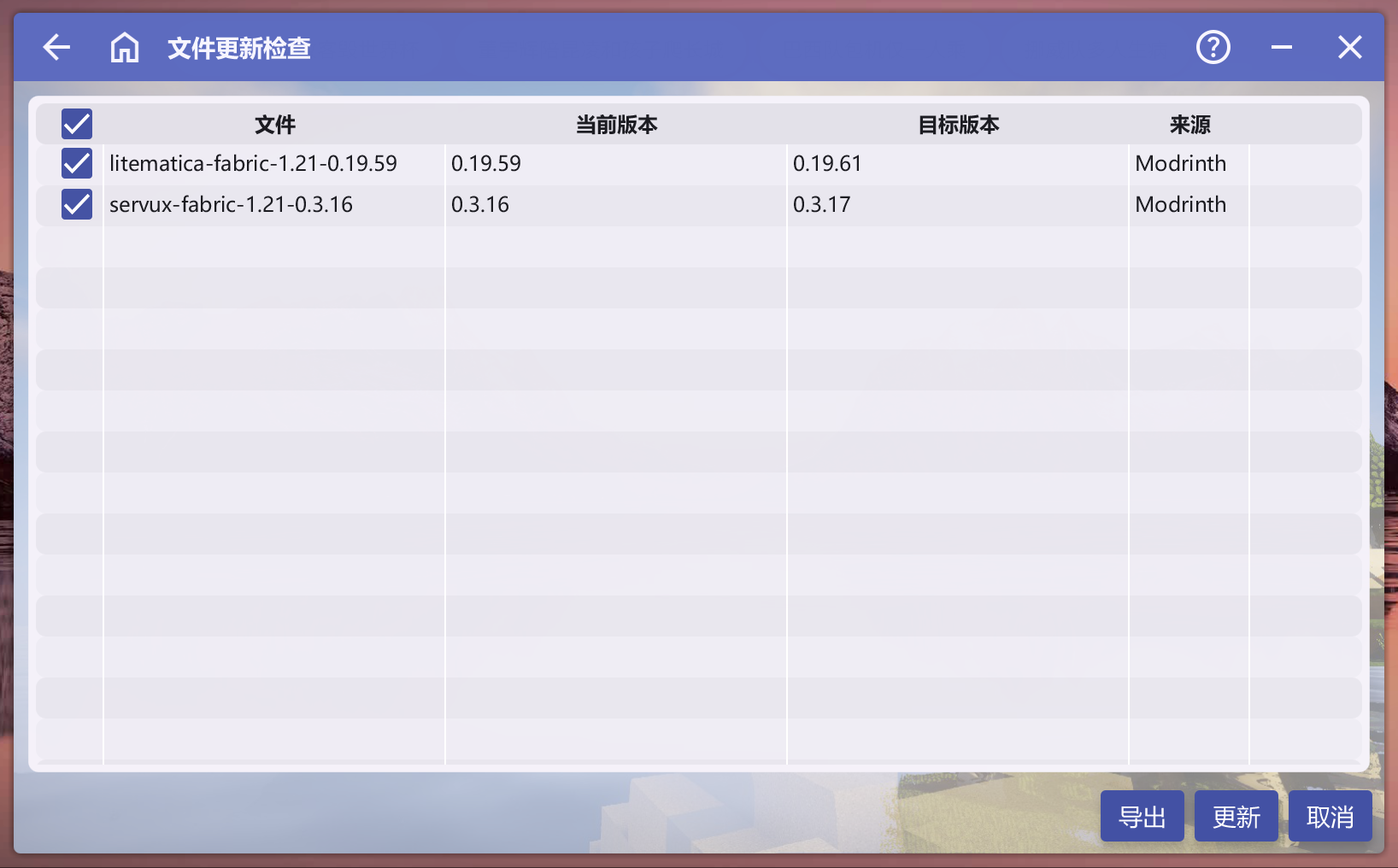
Make sure the only mods you're updating are the two shown in the image. After confirming no other mods are accidentally checked, tap the Update button in the bottom-right corner and follow the prompts.
After updating the mods, please continue following this document to disable the conflicting mods to avoid crashes!
Using Fold Craft Launcher
(Hereinafter referred to as FCL)
First, select the version you need, then tap the settings button on the left, and tap Manage Mods at the top.
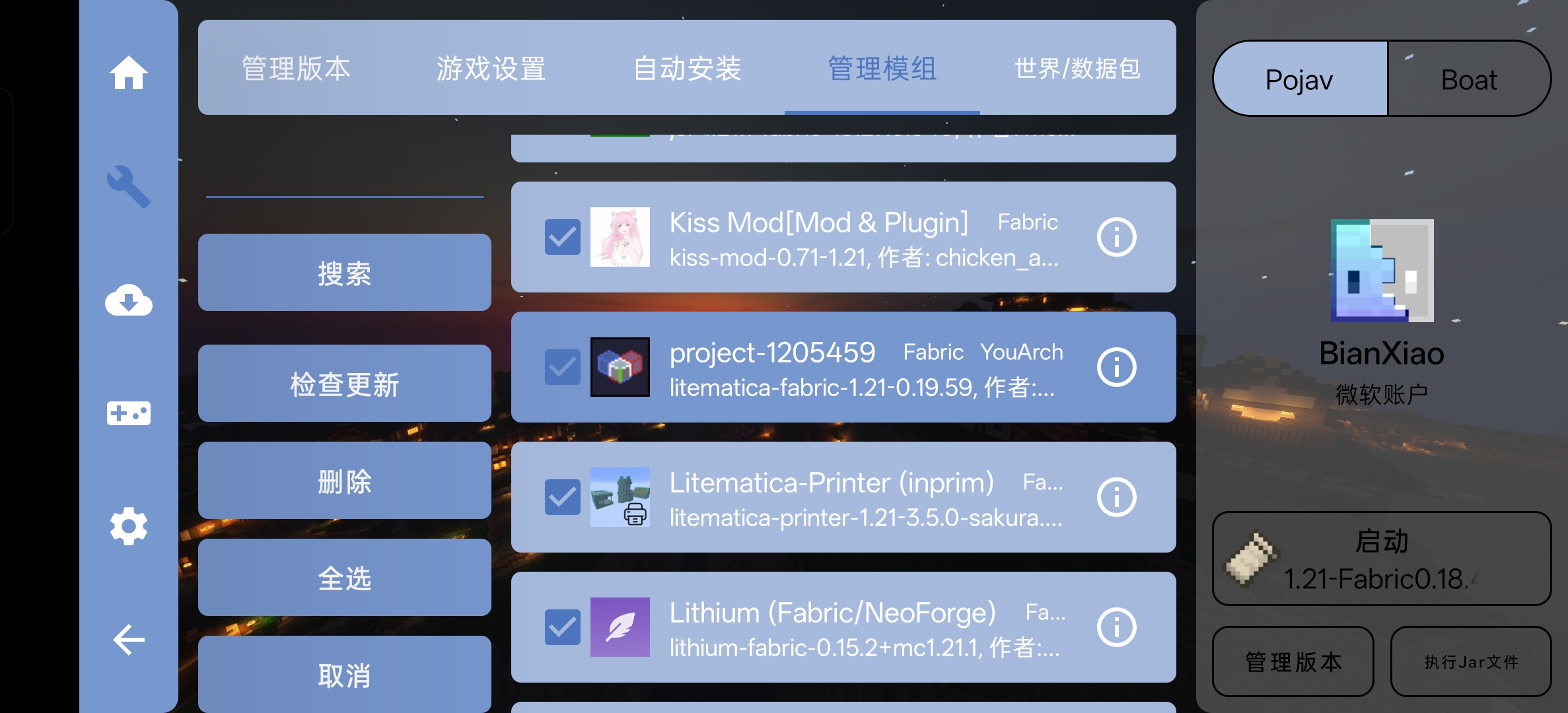
In the list, find Litematica and Servux, tap each one to select them. You'll see the background color of the selected mods change slightly. Then tap Check for Updates on the left. You'll see an interface like the one below.
If you can't find
Litematica, you can identify the mod to update by the second line of text — the file name. The file names should belitematica-fabric-1.21-0.19.59andservux-fabric-1.21-0.3.16.
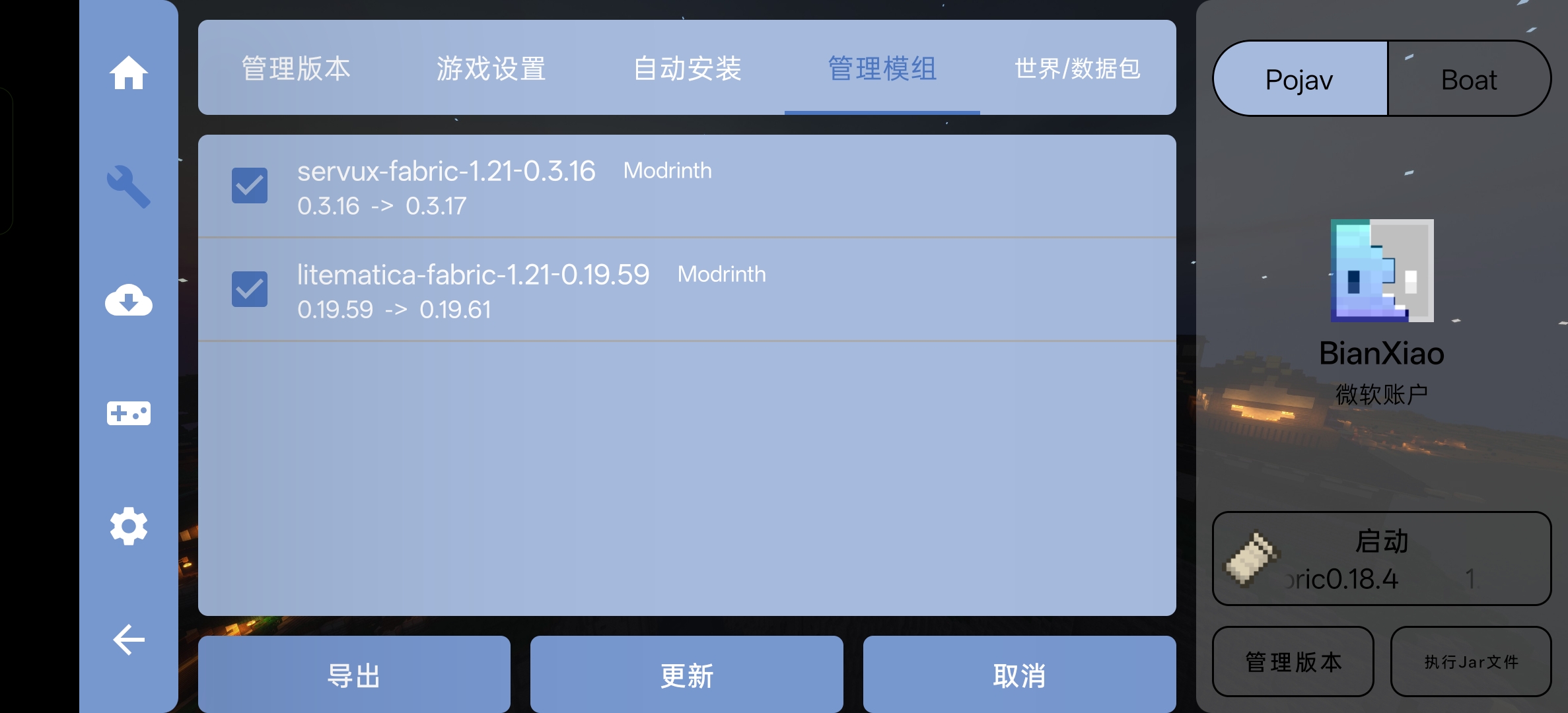
Make sure the only mods you're updating are the two shown in the image. After confirming no other mods are accidentally checked, tap the Update button at the bottom and follow the prompts.
After updating the mods, please continue following this document to disable the conflicting mods to avoid crashes!
Disable Conflicting Mods
Using Plain Craft Launcher 2
(Hereinafter referred to as PCL2)
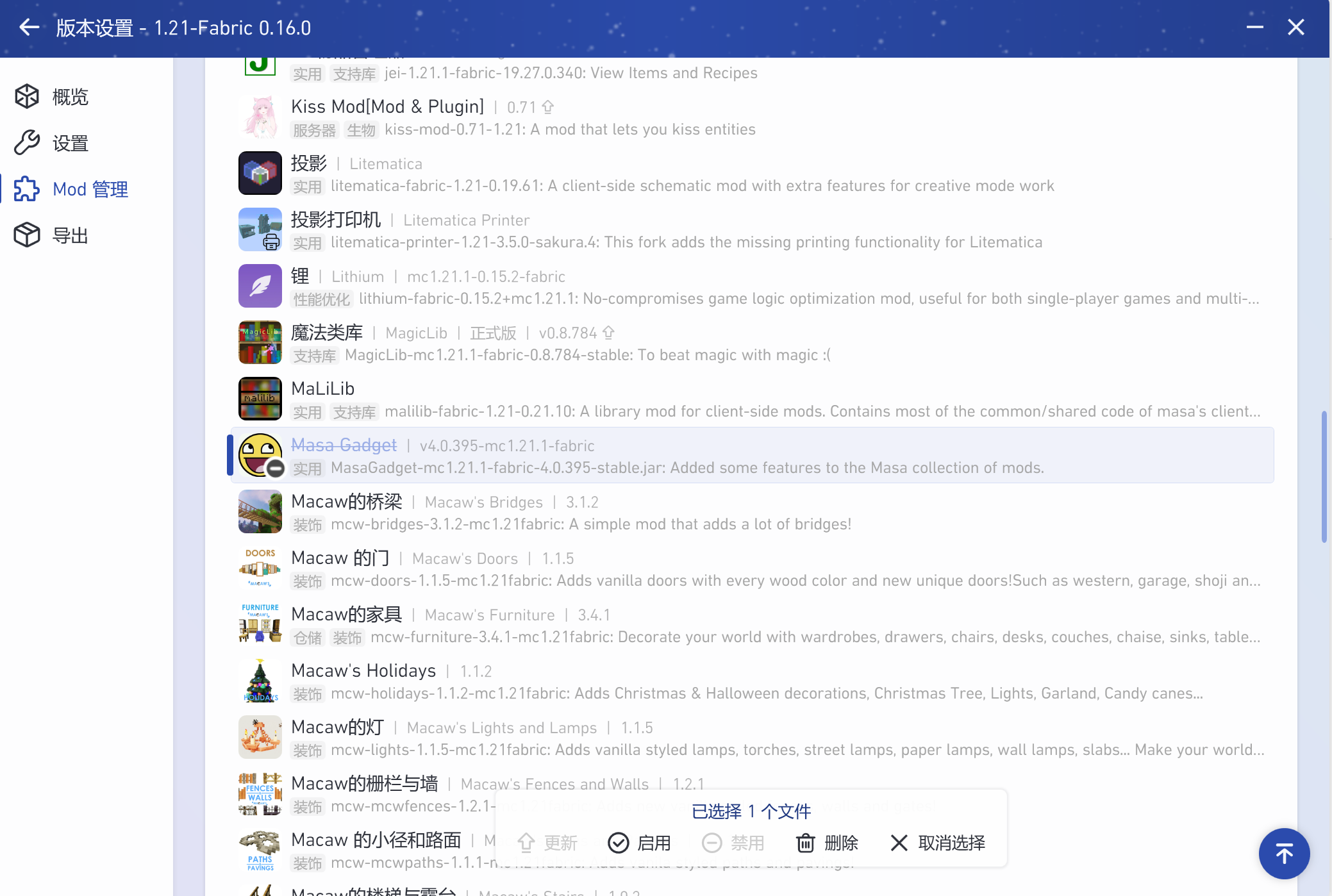
Go back to the Mod Management page, find Masa Gadget, tap it once, then tap Disable in the popup at the bottom. As shown in the image below.
Using Hello Minecraft! Launcher
(Hereinafter referred to as HMCL)
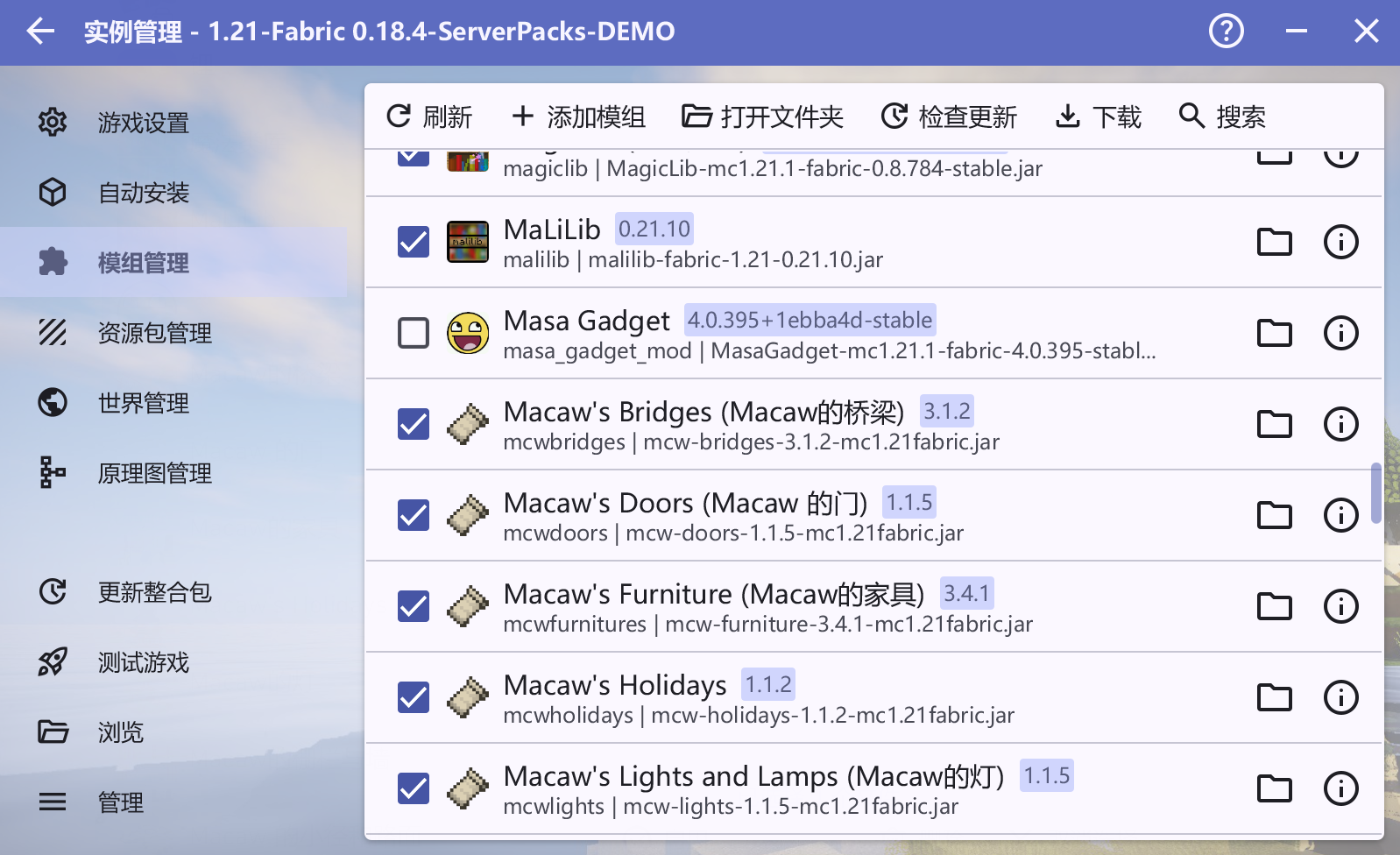
Go back to the Mod Management page, find Masa Gadget, and uncheck the checkbox on the left. As shown in the image below.
Using Fold Craft Launcher
(Hereinafter referred to as FCL)
Go back to the Manage Mods page, find Masa Gadget, and uncheck the checkbox on the left. As shown in the image below.